MCP Integration
ExtendedLM integrates Model Context Protocol (MCP) for extensible tool systems and external service integration.
Model Context Protocol is an open standard for connecting AI models to external tools, data sources, and services. MCP servers expose tools that LLMs can invoke during generation.
Key Features
- Dynamic Tool Loading: Discover tools from MCP servers at runtime
- Multi-Server Support: Connect to multiple MCP servers simultaneously
- Stdio & HTTP: Support for stdio and HTTP transport protocols
- Natural Language: LLMs invoke tools via natural language understanding
- Extensible: Easy to add new MCP servers
MCP Components
- Client Manager: Manages connections to MCP servers
- Dynamic Tools: Loads and exposes MCP tools to agents
- MCP Agent: Specialized agent for MCP tool invocation
Architecture
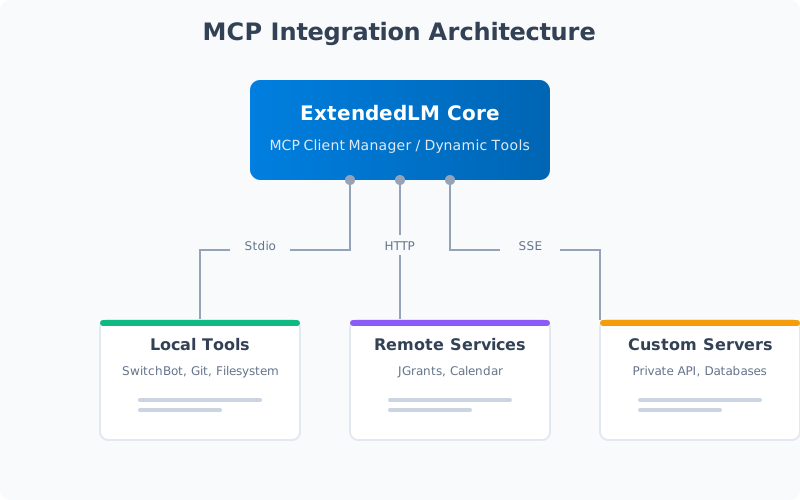
Components
src/mcp/
├── clientManager.ts     # MCP server connection management
├── dynamicTools.ts      # Tool loading from MCP servers
└── mcpManager.ts        # Server lifecycle management
Data Flow
- ExtendedLM reads
mcp.jsonconfiguration - Client Manager connects to configured MCP servers
- Dynamic Tools discovers available tools from servers
- MCP Agent receives user request
- Agent determines which tool to invoke
- Client Manager sends tool invocation to MCP server
- Server executes tool and returns result
- Agent formats result for user
Configuration File
File: mcp.json
{
  "mcpServers": {
    "cal2prompt": {
      "type": "stdio",
      "command": "cal2prompt.exe",
      "args": ["mcp"],
      "env": {},
      "disabled": false
    },
    "switchbot": {
      "type": "stdio",
      "command": "python",
      "args": ["-m", "switchbot_mcp"],
      "env": {
        "SWITCHBOT_ACCESS_TOKEN": "your_token",
        "SWITCHBOT_SECRET": "your_secret"
      },
      "disabled": true
    },
    "jgrants": {
      "type": "stdio",
      "command": "python",
      "args": ["-m", "jgrants_mcp"],
      "workingDirectory": "apps/MCP/jgrants-mcp-server",
      "disabled": false
    }
  }
}
cal2prompt Server
Overview
Calendar integration for event management and scheduling.
Configuration
{
  "cal2prompt": {
    "type": "stdio",
    "command": "cal2prompt.exe",
    "args": ["mcp"]
  }
}
Available Tools
- list_events: List calendar events
- create_event: Create new calendar event
- update_event: Update existing event
- delete_event: Delete calendar event
Example Usage
User: What are my meetings today?
MCP Agent: [Invokes list_events tool]
Response: You have 3 meetings today:
- 9:00 AM: Team standup
- 2:00 PM: Product review
- 4:00 PM: 1-on-1 with manager
SwitchBot Server
Overview
Smart home device control via SwitchBot API.
Configuration
{
  "switchbot": {
    "type": "stdio",
    "command": "python",
    "args": ["-m", "switchbot_mcp"],
    "env": {
      "SWITCHBOT_ACCESS_TOKEN": "your_access_token",
      "SWITCHBOT_SECRET": "your_secret_key"
    }
  }
}
Available Tools
- list_devices: List all SwitchBot devices
- get_device_status: Get device status
- control_device: Send command to device
Supported Devices
- Bot (switch controller)
- Curtain (smart curtains)
- Plug (smart plug)
- Light (smart bulbs)
- Hub (infrared remote)
Example Usage
User: Turn on the living room light
MCP Agent: [Invokes control_device tool]
Response: Living room light has been turned on.
jgrants Server
Overview
Grant management system for searching and managing research grants.
Configuration
{
  "jgrants": {
    "type": "stdio",
    "command": "python",
    "args": ["-m", "jgrants_mcp"],
    "workingDirectory": "apps/MCP/jgrants-mcp-server"
  }
}
Available Tools
- search_grants: Search available grants
- get_grant_details: Get detailed grant information
- filter_grants: Filter grants by criteria
Example Usage
User: Find AI research grants closing this month
MCP Agent: [Invokes search_grants tool]
Response: Found 5 AI research grants closing this month:
1. NSF AI Innovation Grant - Deadline: Jan 31
2. DARPA AI Research Fund - Deadline: Jan 28
...
Creating MCP Servers
MCP Server Structure
An MCP server is a program that:
- Implements the MCP protocol (stdio or HTTP)
- Exposes tools via JSON-RPC
- Handles tool invocations and returns results
Python MCP Server Example
from mcp.server import Server
from mcp.types import Tool, TextContent

app = Server("my-mcp-server")

@app.list_tools()
async def list_tools() -> list[Tool]:
    return [
        Tool(
            name="get_weather",
            description="Get current weather",
            inputSchema={
                "type": "object",
                "properties": {
                    "location": {
                        "type": "string",
                        "description": "City name"
                    }
                },
                "required": ["location"]
            }
        )
    ]

@app.call_tool()
async def call_tool(name: str, arguments: dict):
    if name == "get_weather":
        location = arguments["location"]
        # Fetch weather data
        weather = fetch_weather(location)
        return [TextContent(
            type="text",
            text=f"Weather in {location}: {weather}"
        )]

if __name__ == "__main__":
    app.run()
TypeScript MCP Server Example
import { Server } from "@modelcontextprotocol/sdk/server/index.js"
import { StdioServerTransport } from "@modelcontextprotocol/sdk/server/stdio.js"

const server = new Server({
  name: "my-mcp-server",
  version: "1.0.0"
}, {
  capabilities: {
    tools: {}
  }
})

server.setRequestHandler(ListToolsRequestSchema, async () => {
  return {
    tools: [
      {
        name: "get_weather",
        description: "Get current weather",
        inputSchema: {
          type: "object",
          properties: {
            location: {
              type: "string",
              description: "City name"
            }
          },
          required: ["location"]
        }
      }
    ]
  }
})

server.setRequestHandler(CallToolRequestSchema, async (request) => {
  if (request.params.name === "get_weather") {
    const location = request.params.arguments.location
    const weather = await fetchWeather(location)
    return {
      content: [
        {
          type: "text",
          text: `Weather in ${location}: ${weather}`
        }
      ]
    }
  }
})

const transport = new StdioServerTransport()
await server.connect(transport)
Add to ExtendedLM
1. Add server configuration to mcp.json:
{
  "my-server": {
    "type": "stdio",
    "command": "python",
    "args": ["-m", "my_mcp_server"]
  }
}
2. Restart ExtendedLM
3. Tools will be automatically available in MCP Agent
MCP Agent Integration
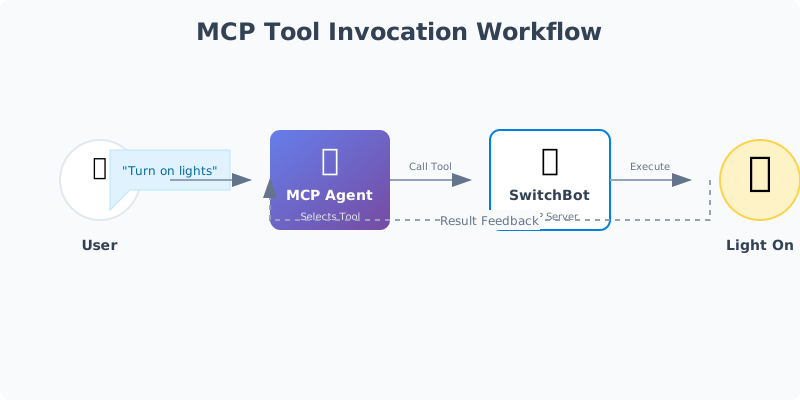
MCP Agent
File: src/bringup/agents/mcp-agent.ts
How It Works
- MCP Agent loads all tools from configured servers
- User sends natural language request
- Agent determines which tool(s) to invoke
- Agent calls MCP server via Client Manager
- Server executes tool and returns result
- Agent formats result for user
Tool Discovery
import { getMcpTools } from '@/mcp/dynamicTools'

const mcpTools = await getMcpTools()

// mcpTools is an array of AI SDK compatible tools
const agent = createMcpAgent(mcpTools)
Agent Execution
const response = await agent.execute(
  messages,
  {
    userId: 'user-123',
    modelKey: 'openai:gpt-4o'
  },
  mcpTools
)

// Agent automatically invokes MCP tools as needed
Multi-Tool Invocation
Agent can invoke multiple MCP tools in sequence:
User: Get my calendar for today and turn off bedroom light

Agent:
1. [Invokes cal2prompt list_events]
2. [Invokes switchbot control_device]

Response:
Today's events: Team meeting at 10 AM, Lunch at 12 PM
Bedroom light has been turned off.
MCP API Reference
Get MCP Configuration
Endpoint: GET /api/mcp-config
{
  "mcpServers": {
    "cal2prompt": {
      "type": "stdio",
      "command": "cal2prompt.exe",
      "disabled": false
    }
  }
}
List Available Tools
Endpoint: GET /api/mcp/tools
{
  "tools": [
    {
      "server": "cal2prompt",
      "name": "list_events",
      "description": "List calendar events",
      "inputSchema": {
        "type": "object",
        "properties": {
          "start_date": { "type": "string" },
          "end_date": { "type": "string" }
        }
      }
    }
  ]
}
Test MCP Connection
Endpoint: POST /api/mcp-test
{
  "serverName": "cal2prompt"
}
Response:
{
  "status": "connected",
  "tools": 4,
  "latency_ms": 23
}
Update MCP Configuration
Endpoint: POST /api/mcp-config
{
  "mcpServers": {
    "new-server": {
      "type": "stdio",
      "command": "python",
      "args": ["-m", "new_server"]
    }
  }
}