Gateway System
ExtendedLM Gateway is a Rust-based unified LLM gateway with OpenAI-compatible API supporting multiple providers and local inference.
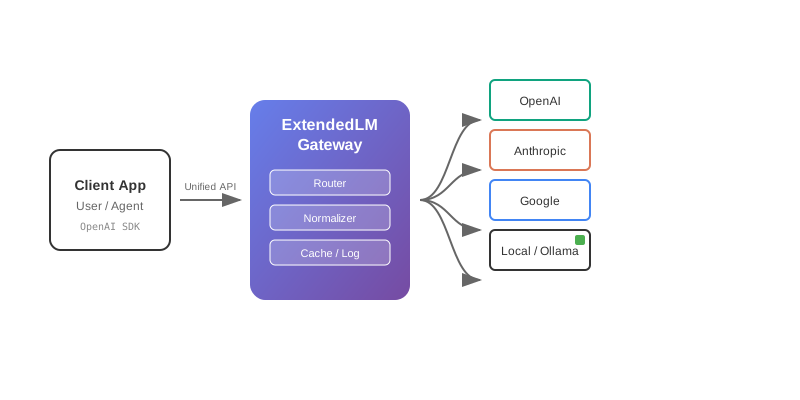
Gateway provides a single API endpoint for all LLM providers (OpenAI, Anthropic, Google, xAI, OpenRouter) plus local model inference via llama.cpp and MLX. It handles request routing, response normalization, and logging automatically.
Key Features
- Unified API: OpenAI-compatible Responses API for all providers
- Local Inference: Built-in llama.cpp with GPU acceleration
- Streaming: Server-Sent Events (SSE) support
- Structured Output: JSON Schema validation
- Tool Calling: Function calling across providers
- Vision Support: Image input for multimodal models
- Realtime API: WebSocket-based realtime communication
- Request Logging: SQLite-based analytics
Supported Providers
OpenAI
GPT-4o, GPT-5 series
Anthropic
Claude Opus 4, Sonnet 4
Gemini 2.5 Flash/Pro
xAI
Grok-4 Fast
OpenRouter
Multiple models via OpenRouter API
llama.cpp
GGUF models with GPU
Architecture
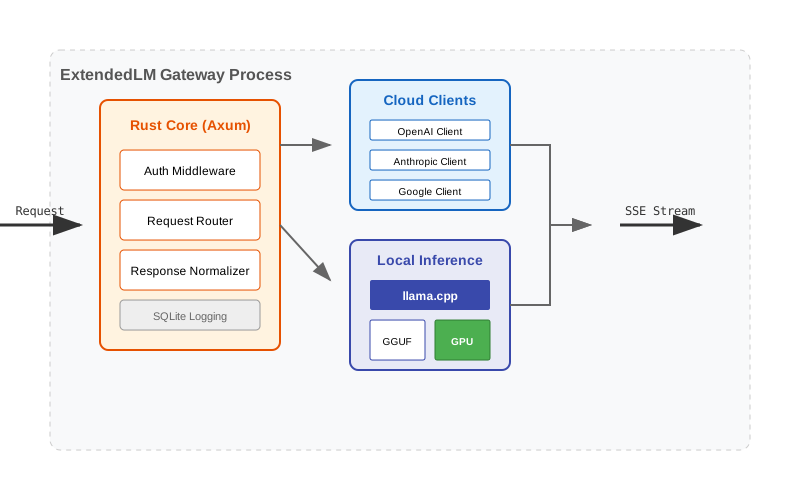
Components
- Rust Core: High-performance HTTP server
- llama.cpp: Statically linked for local inference
- Provider Clients: API clients for each LLM provider
- Request Router: Route requests to appropriate provider
- Response Normalizer: Unify response formats
- SQLite Logger: Request/response analytics
Request Flow
- Client sends OpenAI-format request to Gateway
- Gateway parses model key (e.g., "openai:gpt-4o")
- Routes to appropriate provider or llama.cpp
- Normalizes response to OpenAI format
- Streams back to client via SSE
- Logs request/response to SQLite
Directory Structure
apps/Gateway/
├── src/
│   ├── main.rs              # Entry point
│   ├── providers/           # Provider implementations
│   │   ├── openai.rs
│   │   ├── anthropic.rs
│   │   ├── google.rs
│   │   ├── xai.rs
│   │   └── openrouter.rs
│   ├── llama/               # llama.cpp integration
│   ├── responses_api.rs     # Responses API handler
│   └── realtime_api.rs      # Realtime WebSocket API
├── config/
│   └── lmbridge.env          # Configuration
├── Cargo.toml               # Rust dependencies
└── build.rs                 # Build script (llama.cpp)
OpenAI Provider
Supported Models
- GPT-5: gpt-5, gpt-5-mini, gpt-5-nano
- GPT-4o: gpt-4o, gpt-4o-mini
- O-series: o1, o3-mini
Features
- Tools (function calling)
- Vision (image input)
- Streaming
- Structured outputs (JSON mode)
- Response format control
Configuration
# lmbridge.env
OPENAI_API_KEY=sk-proj-...
Model Key Format
openai:gpt-4o
openai:gpt-5-mini
openai:o3-mini
Example Request
{
  "model": "openai:gpt-4o",
  "messages": [
    {
      "role": "user",
      "content": "Hello!"
    }
  ],
  "stream": true
}
Anthropic (Claude) Provider
Supported Models
- Claude Opus 4: claude-opus-4, claude-opus-4.1
- Claude Sonnet 4: claude-sonnet-4
- Claude 3.7: claude-3-7-sonnet-20250219
- Claude 3.5: claude-3-5-sonnet-20241022, claude-3-5-haiku-20241022
Features
- Tools (function calling)
- Vision (image input)
- Streaming
- Extended thinking (thinking blocks)
- System prompts with caching
Configuration
# lmbridge.env
ANTHROPIC_API_KEY=sk-ant-...
Model Key Format
anthropic:claude-opus-4
anthropic:claude-sonnet-4
anthropic:claude-3-7-sonnet-20250219
Extended Thinking
Claude models support extended thinking mode for complex reasoning:
{
  "model": "anthropic:claude-opus-4",
  "messages": [...],
  "thinking": {
    "type": "enabled",
    "budget_tokens": 10000
  }
}
Google (Gemini) Provider
Supported Models
- Gemini 2.5: gemini-2.5-flash, gemini-2.5-pro
- Gemini 2.0: gemini-2.0-flash-exp
- Gemini 1.5: gemini-1.5-pro, gemini-1.5-flash
Features
- Tools (function calling)
- Vision (image/video input)
- Streaming
- Structured outputs (JSON mode)
- Large context windows (up to 2M tokens)
Configuration
# lmbridge.env
GOOGLE_API_KEY=AIza...
Model Key Format
google:gemini-2.5-flash
google:gemini-2.5-pro
Structured Output
{
  "model": "google:gemini-2.5-flash",
  "messages": [...],
  "response_format": {
    "type": "json_schema",
    "json_schema": {
      "name": "user_data",
      "schema": {
        "type": "object",
        "properties": {
          "name": { "type": "string" },
          "age": { "type": "number" }
        }
      }
    }
  }
}
xAI (Grok) Provider
Supported Models
- Grok-4 Fast: grok-4-fast, grok-4-fast-no-reasoning
Features
- High-speed inference
- Streaming
- Reasoning/no-reasoning modes
Configuration
# lmbridge.env
XAI_API_KEY=xai-...
Model Key Format
xai:grok-4-fast
xai:grok-4-fast-no-reasoning
OpenRouter Provider
Supported Models
Access hundreds of models through the OpenRouter API:
- OpenAI: GPT-4o, GPT-5 series
- Anthropic: Claude Opus, Sonnet
- Google: Gemini models
- Meta: Llama models
- Mistral: Mistral, Mixtral
- Many more via OpenRouter catalog
Features
- Access to 100+ models through one API
- Automatic model routing
- Streaming support
- OpenAI Responses API compatible
Configuration
# Environment variables
export OPENROUTER_API_KEY=your-key-here
export OPENROUTER_HTTP_REFERER=your-app-url  # Optional
export OPENROUTER_X_TITLE=your-app-name       # Optional
Model Key Format
openrouter:openai/gpt-4o
openrouter:anthropic/claude-3.5-sonnet
openrouter:meta-llama/llama-3-70b
Gateway llama.cpp Provider
Overview
Gateway includes built-in llama.cpp for local GGUF model inference with GPU acceleration.
Featured Models
- Gemma-3-270m-it-Q4_K_M: Test model (270M params)
- Gemma-3-4b-it-q4_0: Vision model (4B params)
- Phi-4-mini-instruct-Q4_K_M: Instruction-tuned (14B params)
- Qwen3-14B-Q8_0: Large context (14B params)
- PLaMo-2-translate-Q4_0: EN/JP translation
GPU Acceleration
Gateway automatically detects CUDA and offloads layers to GPU:
# lmbridge.env
GATEWAY_GPU_LAYERS=-1  # -1 = all layers to GPU
GATEWAY_THREADS=8      # CPU threads for non-GPU parts
Configuration
# lmbridge.env
GATEWAY_GGUF_EXTRA_DIR=/path/to/models
GATEWAY_GPU_LAYERS=-1
GATEWAY_THREADS=8
GATEWAY_TOP_K=40
GATEWAY_TOP_P=0.9
GATEWAY_STRUCTURED_MODE=auto  # auto, strict, prompt, off
GATEWAY_STRUCTURED_PLAN=auto  # auto, system, off
Model Key Format
lmbridge:phi-4-mini-instruct
lmbridge:qwen3-14b
lmbridge:plamo-2-translate
Vision Support
For vision models, place mmproj file alongside the model:
models/llama/
├── Gemma-3-4b-it-q4_0.gguf
└── Gemma-3-4b-it-mmproj-q4_0.gguf
Vision Request Example
{
  "model": "lmbridge:gemma-3-4b-it",
  "messages": [
    {
      "role": "user",
      "content": [
        {
          "type": "text",
          "text": "What's in this image?"
        },
        {
          "type": "image_url",
          "image_url": {
            "url": "data:image/jpeg;base64,..."
          }
        }
      ]
    }
  ]
}
Responses API
Endpoint: POST /v1/responses
OpenAI-compatible text generation API.
Request Format
{
  "model": "openai:gpt-4o",
  "messages": [
    {
      "role": "system",
      "content": "You are a helpful assistant."
    },
    {
      "role": "user",
      "content": "Hello!"
    }
  ],
  "stream": true,
  "temperature": 0.7,
  "max_tokens": 1000,
  "tools": [...],
  "tool_choice": "auto"
}
Response Format (Non-Streaming)
{
  "id": "resp_123",
  "object": "response",
  "created": 1234567890,
  "model": "openai:gpt-4o",
  "choices": [
    {
      "index": 0,
      "message": {
        "role": "assistant",
        "content": "Hello! How can I help you?"
      },
      "finish_reason": "stop"
    }
  ],
  "usage": {
    "prompt_tokens": 10,
    "completion_tokens": 8,
    "total_tokens": 18
  }
}
Streaming Response (SSE)
When stream: true, Gateway returns Server-Sent Events:
data: {"type":"response.start","response":{"id":"resp_123"}}

data: {"type":"content.delta","delta":{"text":"Hello"}}

data: {"type":"content.delta","delta":{"text":"!"}}

data: {"type":"response.done","response":{...}}
Tool Calling
{
  "model": "openai:gpt-4o",
  "messages": [...],
  "tools": [
    {
      "type": "function",
      "function": {
        "name": "get_weather",
        "description": "Get weather for a location",
        "parameters": {
          "type": "object",
          "properties": {
            "location": { "type": "string" }
          },
          "required": ["location"]
        }
      }
    }
  ],
  "tool_choice": "auto"
}
Response with tool call:
{
  "choices": [
    {
      "message": {
        "role": "assistant",
        "tool_calls": [
          {
            "id": "call_123",
            "type": "function",
            "function": {
              "name": "get_weather",
              "arguments": "{\"location\":\"Tokyo\"}"
            }
          }
        ]
      }
    }
  ]
}
Realtime API (WebSocket)
Endpoint: ws://localhost:8080/v1/realtime
WebSocket-based realtime communication with LLMs.
Connection
const ws = new WebSocket('ws://localhost:8080/v1/realtime',
  ['openai-realtime-v1'])

ws.onopen = () => {
  console.log('Connected')
}

ws.onmessage = (event) => {
  const data = JSON.parse(event.data)
  console.log('Received:', data)
}
Send Message
ws.send(JSON.stringify({
  type: 'response.create',
  response: {
    modalities: ['text'],
    instructions: 'You are a helpful assistant.',
    input: [
      {
        type: 'message',
        role: 'user',
        content: [
          {
            type: 'input_text',
            text: 'Hello!'
          }
        ]
      }
    ]
  }
}))
Receive Events
ws.onmessage = (event) => {
  const msg = JSON.parse(event.data)

  switch (msg.type) {
    case 'response.text.delta':
      console.log('Text:', msg.delta)
      break
    case 'response.done':
      console.log('Done')
      break
  }
}
Service Control API
Get Status
Endpoint: GET /v1/service/status
{
  "status": "ok",
  "cache": {
    "enabled": true,
    "entries": 42
  },
  "uptime_seconds": 3600
}
Stop Current Inference
Endpoint: POST /v1/service/stop
Cancels currently running inference.
Shutdown Gateway
Endpoint: POST /v1/service/shutdown
Gracefully shuts down the Gateway server.
Model Management (llama.cpp)
List Loaded Models
Endpoint: GET /v1/local/models
{
  "models": [
    {
      "name": "phi-4-mini-instruct",
      "path": "/models/Phi-4-mini-instruct-Q4_K_M.gguf",
      "loaded": true,
      "gpu_layers": 40
    }
  ]
}
Preload Model
Endpoint: POST /v1/local/models/load
{
  "model": "phi-4-mini-instruct",
  "gpu_layers": -1
}
Unload Model
Endpoint: POST /v1/local/models/unload
{
  "model": "phi-4-mini-instruct"
}
GPU Acceleration
CUDA Support
Gateway automatically detects CUDA and uses GPU for llama.cpp inference.
Configuration
# lmbridge.env
GATEWAY_GPU_LAYERS=-1  # -1 = all layers, 0 = CPU only, N = N layers to GPU
Check GPU Usage
# Terminal 1: Start Gateway
cargo run --release --bin Gateway

# Terminal 2: Monitor GPU
watch -n 1 nvidia-smi
Performance
GPU acceleration provides significant speedup:
- CPU only: ~10-20 tokens/sec (14B model)
- GPU (RTX 3090): ~80-100 tokens/sec (14B model)
- GPU (RTX 4090): ~120-150 tokens/sec (14B model)
Structured Output
JSON Mode
Force model to output valid JSON:
{
  "model": "openai:gpt-4o",
  "messages": [
    {
      "role": "user",
      "content": "Extract name and age from: John is 30 years old"
    }
  ],
  "response_format": {
    "type": "json_object"
  }
}
JSON Schema (Google/OpenAI)
{
  "model": "google:gemini-2.5-flash",
  "messages": [...],
  "response_format": {
    "type": "json_schema",
    "json_schema": {
      "name": "person",
      "strict": true,
      "schema": {
        "type": "object",
        "properties": {
          "name": { "type": "string" },
          "age": { "type": "number" }
        },
        "required": ["name", "age"],
        "additionalProperties": false
      }
    }
  }
}
llama.cpp Structured Mode
Gateway llama.cpp supports structured output via grammar:
# lmbridge.env
GATEWAY_STRUCTURED_MODE=auto  # auto, strict, prompt, off
GATEWAY_STRUCTURED_PLAN=auto  # auto, system, off
Tool Calling
Define Tools
{
  "model": "anthropic:claude-sonnet-4",
  "messages": [...],
  "tools": [
    {
      "type": "function",
      "function": {
        "name": "search_web",
        "description": "Search the web",
        "parameters": {
          "type": "object",
          "properties": {
            "query": {
              "type": "string",
              "description": "Search query"
            }
          },
          "required": ["query"]
        }
      }
    }
  ]
}
Tool Choice
"auto"- Model decides"none"- Never use tools{"type":"function","function":{"name":"search_web"}}- Force specific tool
Handle Tool Calls
// 1. Send request with tools
const response = await fetch('/v1/responses', {
  method: 'POST',
  body: JSON.stringify({ model, messages, tools })
})

// 2. Check for tool calls
if (response.choices[0].message.tool_calls) {
  const toolCall = response.choices[0].message.tool_calls[0]

  // 3. Execute tool
  const result = await executeToolLocally(toolCall)

  // 4. Send result back to model
  messages.push({
    role: 'tool',
    tool_call_id: toolCall.id,
    content: JSON.stringify(result)
  })

  // 5. Get final response
  const finalResponse = await fetch('/v1/responses', {
    method: 'POST',
    body: JSON.stringify({ model, messages, tools })
  })
}
Gateway Configuration
File: apps/Gateway/config/gateway.env
Full Configuration
# Server
GATEWAY_HOST=0.0.0.0
GATEWAY_PORT=8080

# API Keys
OPENAI_API_KEY=sk-proj-...
ANTHROPIC_API_KEY=sk-ant-...
GOOGLE_API_KEY=AIza...
XAI_API_KEY=xai-...

# OpenRouter
OPENROUTER_API_KEY=your-key-here

# llama.cpp (local models)
GATEWAY_GGUF_EXTRA_DIR=/path/to/models
GATEWAY_GPU_LAYERS=-1
GATEWAY_TOP_K=40
GATEWAY_TOP_P=0.9
GATEWAY_STRUCTURED_MODE=auto
GATEWAY_STRUCTURED_PLAN=auto

# Logging
LOG_LEVEL=info
SQLITE_DB_PATH=./lmbridge.sqlite

# Cache
CACHE_ENABLED=true
CACHE_TTL_SECONDS=300
Build Build & Run
Run
# Clone repository (URL will be provided)
cd ExtendedLM/apps/Gateway

# Set model directory
export GATEWAY_GGUF_EXTRA_DIR=$PWD/../../models/llama

# Build (downloads llama.cpp automatically)
cargo build --release

# Run
cargo run --release --bin Gateway
Docker (Alternative)
# Build Docker image
docker build -t lmbridge .

# Run container
docker run -p 8080:8080 \
  -v ./models:/models \
  -e GATEWAY_GGUF_EXTRA_DIR=/models \
  lmbridge