Introduction to ExtendedLM
ExtendedLM is a comprehensive AI agent platform that provides multi-provider LLM integration, advanced agent systems, visual workflow creation, and RAG capabilities.
ExtendedLM is a platform for building intelligent AI applications. It combines multiple LLM providers, specialized agents, workflow automation, and retrieval-augmented generation in a unified development environment.
Core System Architecture
ExtendedLM operates as a central hub connecting user interfaces, intelligent agents, visual workflows, and various LLM providers.
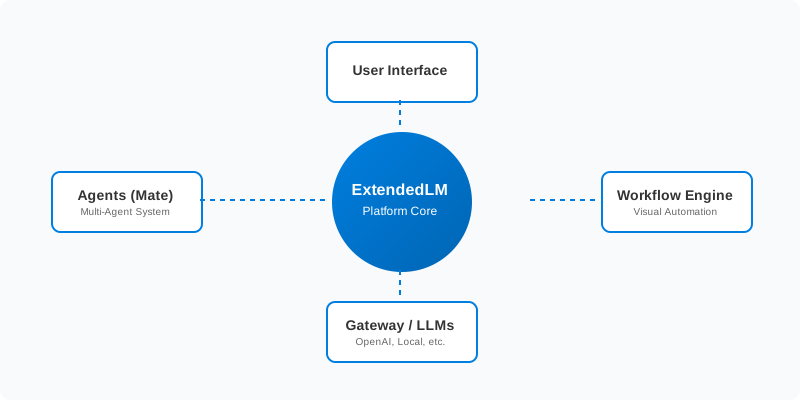
Figure 1: ExtendedLM Platform Architecture
Core Capabilities
- Multi-Agent System: 8 specialized agents for translation, RAG, PDF reading, slide generation, document creation, and computer use
- Unified Gateway: Single API for OpenAI, Anthropic, Google, xAI, OpenRouter, and local models via llama.cpp
- Visual Workflows: Drag-and-drop workflow builder with ReactFlow integration
- Advanced RAG: Vector search, knowledge graphs (GraphRAG), and hybrid retrieval
- MCP Integration: Model Context Protocol support for extensible tools
- Computer Automation: Browser automation, file operations, and shell execution via Mate
Key Features
Agent System
ExtendedLM includes 8 specialized agents, each designed for specific tasks:
Standard Agent
General-purpose conversational AI for Q&A
RAG Agent
Document search with vector similarity
Translation Agent
EN/JP translation
PDF Reading Agent
PDF analysis and extraction
Mate Agent
Browser & system automation
Report Agent
Presentation and report generation
Slide Assistant
HTML slide presentation generation
Document Assistant
Professional document creation
Gateway
Unified LLM gateway with OpenAI-compatible API supporting:
- OpenAI (GPT-4o, GPT-5 series)
- Anthropic (Claude Opus 4, Sonnet 4, 3.7 Sonnet)
- Google (Gemini 2.5 Flash/Pro)
- xAI (Grok-4 Fast)
- OpenRouter (Multiple models via OpenRouter API)
- llama.cpp (Local GGUF models with GPU acceleration)
- MLX (Apple Silicon native inference)
Workflow System
Visual workflow builder with 16 node types (Start, End, LLM, Tool, RAG Tool, Generated Tool, MCP Tool, Condition, If/Else, Iteration, While Loop, Parallel, Merge, Try/Catch, Delay, Note) and real-time execution monitoring.
RAG System
The ExtendedLM RAG system implements a sophisticated pipeline to ensure accurate and context-aware responses from your document knowledge base.

Figure 2: RAG Ingestion and Retrieval Pipeline
The system utilizes a multi-stage process:
- Ingestion & Chunking: Supports PDF, URL, and text inputs with RAPTOR hierarchical chunking for better context preservation.
- Hybrid Storage: Combines PostgreSQL + pgvector for dense vector storage with a Knowledge Graph for structural relationship mapping.
- Intelligent Retrieval: Uses hybrid search (keyword + vector) with reranking to find the most relevant information.
- Global Caching: Accelerates frequent queries using Valkey Search.
Quick Start
Get ExtendedLM running in 5 minutes.
1. Clone Repository
# Repository URL will be provided
cd ExtendedLM
2. Install Dependencies
npm install3. Configure Environment
Copy .env.example to .env.local and configure:
# Supabase
NEXT_PUBLIC_SUPABASE_URL=http://127.0.0.1:54321
NEXT_PUBLIC_SUPABASE_ANON_KEY=your_anon_key
SUPABASE_SERVICE_ROLE_KEY=your_service_role_key

# AI Providers
OPENAI_API_KEY=sk-...
XAI_API_KEY=xai-...
GOOGLE_API_KEY=...

# Valkey/Redis
VALKEY_HOST=127.0.0.1
VALKEY_PORT=6379
4. Start Development Server
npm run devOpen http://localhost:3000 in your browser.
5. Start Gateway (Optional)
For local model inference:
cd apps/Gateway
export LLAMA_MODEL_DIR=$PWD/../../models/llama
cargo run --release --bin gateway
6. Start Mate (Optional)
For Computer Use agent:
cd apps/Mate
./setup/start.sh
Installation
Prerequisites
- Node.js: 18.x or later
- npm: 9.x or later
- PostgreSQL: 14+ with pgvector extension
- Valkey/Redis: For caching (optional but recommended)
- Docker: For Mate (optional)
- Rust: 1.70+ for Gateway compilation (optional)
Clone Repository
# Repository URL will be provided
cd ExtendedLM
Install Dependencies
npm installSetup Database
You can use Supabase (cloud or local) or a custom PostgreSQL setup.
Option 1: Local Supabase
# Install Supabase CLI
npm install -g supabase

# Start local Supabase
supabase start

# Apply migrations
supabase db push
Option 2: Supabase Cloud
- Create a project at supabase.com
- Run migrations:
supabase db push - Configure Storage buckets:
files,rag-images
Configure Environment
Create .env.local from .env.example:
cp .env.example .env.localEdit .env.local with your credentials.
Start Development
npm run devAccess at http://localhost:3000